
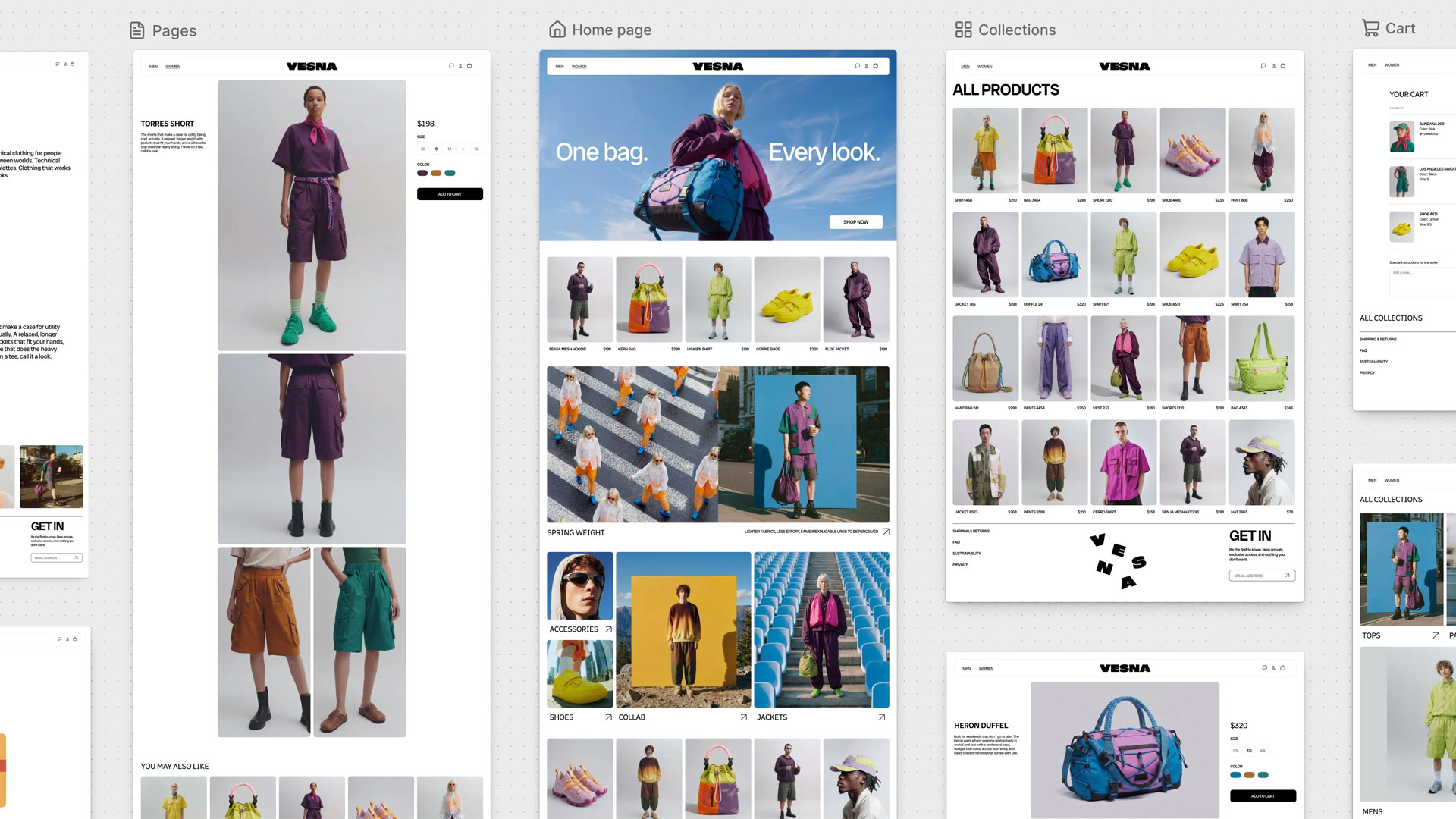
Shopify introduced Canvas, a new workspace for designing storefronts that lays out every page of a merchant’s website side by side through a Figma-esque experience. Merchants can pan across the whole store, zoom into pages and sections, and either edit elements directly or ask Sidekick to make the changes for them. The tool works directly on the theme’s code, validates its own changes, and takes screenshots to check how they landed before handing the result back. The outcome is a working render of the store that can be clicked on and interacted with, not just a static preview.
Canvas is currently in early access and rolling out to certain stores over the coming days. It’s also only available on desktop for now, which makes sense because that would be a nightmare UI on mobile. Shopify says it isn’t replacing the existing theme editor yet, but plans to do so are on the horizon. (Get it, “horizon”?)
Here’s what Canvas can do:
- Show every page of the store in one workspace
- Edit any element by clicking it, or by describing the change to Sidekick in chat
- Build an entirely new theme from a description of the brand, or redesign a copy of an existing theme
- Make changes that aren’t available in a block’s settings
- Preview pages with real products, collections, animations, and screen sizes
Here’s what Canvas can’t do (yet):
- Edit third-party themes from the Shopify Theme Store. It only works with Shopify-built themes and custom themes.
- Support app blocks or app embeds, which is a pretty big limitation for the moment, as most stores are dependent on apps to some degree.
- Customize themes by market, run rollouts, or translate content directly, which are also limitations that would make Canvas a non-solution for many stores.
- Deliver updates to any theme that’s been edited in Canvas. Once you taint your theme with the mystical touch of Canvas, there’s no going back with that version, at least for now.
- Let merchants download theme files after editing in Canvas. So in other words, no backups.
What is the industry saying?
Theme developers aren’t happy about the launch. One theme partner wrote on Shopify’s developer forum that Shopify emailed them about Canvas just one hour before announcing it publicly, telling them it understood the launch “will be disruptive to you.” The news also came after a rough year in general for Theme Store developers, with several indicating in a forum thread last month that they’ve had to reduce the size of their teams as theme sales declined. The thread began with a developer pointing out that Shopify replaced the prominent “Explore more themes” card in the admin with another one of its own free themes, leaving only a much smaller “Visit Theme Store” button at the top of the page.
Shopify’s announcement to theme developers didn’t do much to reassure them either, indicating that Canvas at some point will become the default editor. The company added that the Theme Store remains an important destination for merchants today, but also that Shopify is “deeply considering the role of the theme store in this new world” and expects themes to become “a starting point for merchants to realize their vision.”
App developers are frustrated too, because Canvas launched without support for app blocks and embeds, so apps that rely on them won’t appear in themes built or edited in Canvas. One developer warned of a “wave of emails” from merchants asking why their apps stopped working. Another wrote, “We are overwhelmed with all these changes! Enough!” Shopify replied that app support is coming “within the next few weeks.”
Agencies that build custom themes are concerned that Sidekick writes code directly into theme files outside their Git and version control workflows, and they want Shopify’s GitHub integration to work with Canvas. Since themes edited in Canvas can’t be downloaded either, there’s currently no clean way to pull that code back into a local environment for review.
As for merchants… they can’t fucking keep up with all the changes anyway! LOL. It certainly feels that way sometimes. Some early reviewers called Canvas intuitive, while others questioned whether it was a good idea to roll out a new editor without app support a month before Black Friday, though to be fair, they don’t have to use it. However, it is strange (and borderline irresponsible) that Shopify puts out new unfinished tools aimed at DIY merchants, who are also the least likely to understand the technical or business impact of using those tools. You’d think Shopify would handle that type of merchant with white gloves, but instead they throw them to the wolves with their new tech.
This isn’t the first time Shopify has eaten its partners.
I often write about how Shopify has conflicting responsibilities to three distinct groups: its merchants, its investors, and its partners. Pleasing one group often means negatively impacting one or two of the other groups, and keeping partners happy seems to always be last on Shopify’s list of priorities.
Merchants pay the subscription fees and drive GMV, and investors expect growth every quarter, while partners are expected to keep building on a platform that can absorb their product in the next Edition. For years that meant apps, as Shopify brought bundles, subscriptions, store credit, and dozens of other features in-house that merchants used to pay third-party developers for. Now it seems they’re coming after themes and the freelancers and agencies who build custom stores for merchants.
That said, Canvas looks like a powerful tool for merchants, particularly smaller ones who couldn’t afford a developer to customize their store beyond what their theme’s settings allowed. Switching between templates on Shopify’s current theme customizer is a slow and cumbersome process, and I love the ability to get a bird’s-eye view of my entire store design. Canvas is missing a lot of crucial features at launch, but it sounds like most are on the way.
Plus, like it or not, Canvas-like tools are where the industry is headed. It might run over a few thousand developers on the way, but it’s coming regardless.